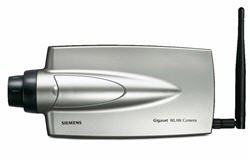
The Siemens gigaset WLAN camera has a big security problem.
Telnet and FTP, port 23 and 21, are completely open to this camera. Anyone can connect to yourcameraIP:23 with a telnet client as root and access the linux router running in the camera without even the need for a single password.
On connecting the camera returns:
Linux 2.4.19-uc1 (SI4e7141) (ttyp0)
SI4e7141 login: root
Welcome to
_ ____
____ ____ __| |___ ____ _ _ \ /
/ __]___ \/ _ | _ \| __ \| | | ||\\//|
| (__( (_) )(_) |(_)_) | | | |_| ||//\\|
\____]\___/\___/\____]_| |_|\____| /__\
Embedded Linux Solutions
For further information see:
http://www.cadenux.com/web/bsp
BusyBox v0.60.3 (2005.08.22-11:11+0000) Built-in shell (msh)
Enter 'help' for a list of built-in commands.
help does not work.
# help
help: not found
#
Possible commands are:
cat
cd
date
df
du
echo
exit
free
hostname
ifconfig
kill
killall
ls
lsmod
mount
nslookup
ping
ps
pwd
reboot
route
set
uptime
whoami
The password of the wireless network is then clearly revealed in a 'file' and open to any visitor who has the capability to use a Linux terminal. Read the 'password file' with the cat command.
No password needed. Ever.
It seems Siemens has no clue about network security. Siemens has no firmware upgrade even though adding a secret password to user root is essential for this to be a usable and save product. Be warned, don't use this camera without adding a firewall.
Monday, June 04, 2007


Monday, April 10, 2006
Siemens gigaset WLAN camera

The Siemens gigaset WLAN camera and its hidden features.
This is not in the manual.
This IP WLAN camera comes with Windows software and can be viewed with internet explorer together with active X.
If you need to the stream can be picked up by any application that can handle .ASF streams.
The stream is found at:
http://-your url-/img/video.asf
With this URL you can watch the camera with many mediaplayers that can open the .ASF format like WinAmp and Windows Media Player even if you are not using Windows.
To make the stream available over the internet and inside the LAN via a router, use an extra port besides port 80. For instance use extra port 1080.
In the router add a port foreward from 1080 to -IP-camera-:1080.
Inside the LAN look at port 80, outside the LAN via the internet, look at port 1080.
Check the article about a security problem with this camera.
Subscribe to:
Posts (Atom)