Friday, May 01, 2015

Ham radio stations in my neighborhood

This map shows my city and the cities around it with red dots for every HAM station registered at QRZ.com

Red dots are HAM radio stations

 This map shows all registered HAM radio antennas around my QTH at http://www.antenneregister.nl.

Green dots are HAM radio stations

There are at this point in time approximately 14.000 HAM radio call-signs and about 13.000 active HAM radio operators in the Netherlands.

Thursday, March 26, 2015

How to export from HRDLOG.net and import to QRZ.com?


Normally I log my QSO's manually on hrdlog.net. The log is automatically exported every day to eQSL.cc and LOTW
To import an ADIF file in QRZ.com I need an ADIF file first. Hmmm... Where to get it? HRDLOG.net does not have an export function to ADIF file.
In HRDLOG you can send the logs to eQSL. eQSL has a feature to export to ADIF.

First make sure to register an eQSL account. Then set the connection to eQSL up in HRDLOG via: Home>Modify profile>eQSL


Next go to eQSL and click on Log/Outbox. Select the entire list.

On the bottom of the page there is a Download link: ( Download entire Inbox in ADIF format (for importing into some loggers)   Click on the link.

Next click on the .ADI file link.
An HTML page will appear. Download it to disk in your browser with File>Save Page As.  

This .ADI file can be imported into QRZ.com.
Log in to QRZ.com and go to My Logbook. Next go to the Settings page where you will be able to add the file.
Now you can start harvesting those QRZ awards.


Wednesday, March 04, 2015

How to Brother HL-2135W on Ubuntu via secure WIFI router

The Brother HL-2135W laser printer only has one USB port and a wireless port. In this "how to" the USB port is never used and there is no need for any USB cable at all.
Your Ubuntu computer can use the printer wireless via your network Access Point or via a wired connection to your router, both work fine after this how to.

I use standard 32 bit Ubuntu 14.04 with the standard Unity GUI and the printer-drivers can be found in the "Ubuntu Software Center" if you search for Brother and unhide the technical items.

The printer runs fine with USB but cannot be configured with USB.

Here is how to get the printers wireless connection to your secure wireless router configured so you can use the printer by any computer in your network without using USB or Windows .

First turn on the printer in range of your wireless router Access Point.
  • Check if the printers WIFI is running, check for the green LED under the USB port on the back of the printer to light up. A new SSID called SETUP should be on air in the 2.4 GHz band. (We might need this SSID later on.)
  • If it does not light up, press and hold the Go button for 10 long seconds to turn on the printers WIFI.
  • Next, press the Go button 3 times within 2 seconds and the "network status page" will be printed.
  • Now check the settings on the paper. If they are all wrong you might want to reset the printer to factory defaults.
If you wish to reset the print server back to its default factory settings (resetting all information such as the password and IP address information), please follow the steps below:
  1. Turn off the printer.
  2. Make sure that the front cover is closed and the power cord is plugged in.
  3. Hold down the Go button as you turn on the power switch. Keep the Go button pressed down until all the LEDs light up, and then the Ready LED turns off.
  4. Release the Go button. Make sure that all the LEDs turn off.
  5. Press the Go button six times. Make sure that all the LEDs light up to indicate the print server has been reset to its factory default settings. The machine will restart.

Don’t forget to turn on the printers WIFI after the reset if needed. IP range 169.254.x.x is given when DHCP fails.
    If you have an open network with DHCP and without security, the printer has already connected to the network and you will see the Brother HL-2135W if you add a new printer in Ubuntu. (Wait for it.) But many wireless Access Points have a password so:
    • Check the IP address on the "network status page" you just printed and open it in your browser. It will open the printers web-control site. (A website inside your printer.) The standard password is admin/access.
    Now this will work if you are very lucky but most wireless network cards are not in the same IP range as the printer so then there is still no connection yet.

    BRAdmin Light works perfectly under WINE (Install wine in Terminal with " sudo apt-get install wine") and finds the wireless printer too.
    It uses its own port (631) to do that. BRAdmin Light is on the CD that came with the Brother HL-2135W and on some download-sites.

    Make a wireless connection in Ubuntu to the printers SSID called "SETUP". You might want to edit the network connection in your Ubuntu to connect successfully. Here are the settings:


    Start BRAdmin Light by pressing the Icon in the dash and it will discover the printer.


    With this tool you can set the printers network settings into the same IP range as your laptop or PC so you can connect to the web-control with your browser.
    • In the web-control site you can set all kind of settings like wireless settings, IP, Subnet Mask, Gateway, SSID and DHCP.
    • Set the printer to use the correct gateway and subnet mask and then set it to DHCP (under TCP/IP settings) and press submit to apply. 
    • Now go to "Network Configuration" - "Configure Wireless" and set up the access to your secured wireless router. (Use infrastructure Mode.) Press submit to apply the new settings.
    • After this is done, Reconnect Ubuntu again to your own wireless Access Point.
    • Reboot the printer or power it off and on again. The printer will now connect to your wireless Access Point and receive an IP from its DHCP server. 
    • Restart BRAdmin Light and it will again find the printer, this time is in the correct network IP range.
    • Any computer in the network can now connect to the web-control site of the printer with an internet browser.
    If you now add a printer in Ubuntu the Brother HL-2135W will magically appear under network printers as long as the PC or laptop is connected to the network. (Wait for Ubuntu to scan the network.)

    As Ubuntu driver choose the jetdirect driver (The one with the ip address.) Then choose Brother foomatic.


    Please let me know if this was any help.

    Monday, October 06, 2014

    50 Mhz dipole made of reed.

    On 50 MHz I never heard anything using a G5RV antenna so I decided to make a dedicated antenna for this HAM band. The band runs from 50 to 52 MHz. So the antenna tunes to 51 MHz.


    50 Mhz dipole made of reed.
    As a mast I used a plastic pole. For the horizontal part I used reed that grows in my garden.
    After I picked the reed I dried it for several years in my shed and now its hard as steel and its still flexible. Ideal antenna material.
    Duck-tape fits everything together.
    RG-58U coax with two insulated wires hang from the reeds where duck-tape keeps them placed.
    I noticed the SSB DX is found between 50.100 and 50.200 MHz. 

    Thursday, February 13, 2014

    How to concat in Cognos report studio, blank / null problem Oracle


    In certain reports, either data contains null values or the results of a complex query can return null values.
    When performing a calculation, null values will cause the calculation to return a null value.
    When concatenating names consisting of  surname, prefix and initials if one of the 3 is missing the result is a complete blank.

    In most cases this may not be the desired result.

    Only Oracle databases have this problem, other databases work fine.
    IBM states its Oracles fault because Oracle does not do standard SQL.

    One of the solutions is to change the data-items you want to concatenate so that a value is returned if the field is a blank. Here is an example:

    [DATABASE].[EMPLOYEE].[PREFIX]


    Change the above data-item into:
    if
    ( [DATABASE].[EMPLOYEE].[PREFIX] is  NULL)
    then
    (  '  ' )
    else
    ( [DATABASE].[EMPLOYEE].[PREFIX] )

    Or change the above data-item into:
    coalesce (  [DATABASE].[EMPLOYEE].[PREFIX] ; '  ' )


    Do this with all the fields that may contain any blanks or null values in the whole Oracle database.
    After this is done it is finally possible to concatenate the several database-fields in Oracle even if one field is NULL or blank.

    Thursday, January 16, 2014

    GMC-320 Geiger counter online with Ubuntu

    Recently I bought a Geiger Muller counter from GQ electronics and connected it to my Ubuntu 12.04 and Ubuntu 13.10 laptop with the supplied USB cable.
    GMC-320: A,B and Gamma radiation detector with on-board logging and viewing of data capabilities, a 'clicking' sound and USB connector.
    With the terminal command dmesg I saw that the device was recognized correctly.

    I would love to see graphics of the log and remote view the data via the internet but the provided software only runs on an expensive disk operating system called "Microsoft Windows".

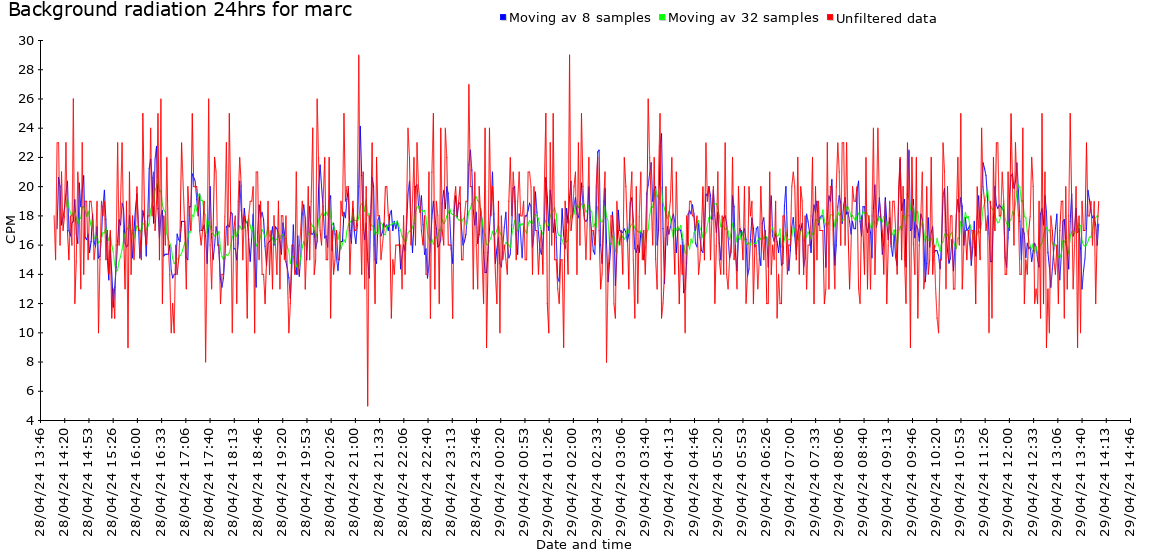
    But luckily there is a free Linux alternative. This will work on any Linux machine but the instructions below are tested on Ubuntu. Following the instructions below will result in a nice dot on a map and access to all kind of log graphics.
    PC1MH background radiation
    I went to www.radmon.org and downloaded pyradmon.py.

    Register at: http://radmon.org/index.php/register

    Download, unzip and save pyradmon.py to your home folder. Make the file executable, add your username to the group dialout and reboot.

    Run in terminal: 
    sudo chmod +x pyradmon.py
    sudo apt-get install python-serial
    sudo adduser yourusername dialout
    sudo reboot


    (Sure it can be done other ways but a reboot is the most simple and I like simple.)

    Log back in and open a terminal.

    Run pyradmon:

    sudo python -u pyradmon.py

    The pyradmon script will generate a configuration file in the same directory for you and stops.

    Now edit the configuration file.(config.txt)

    Fill in your username and password. (Same as the one registered at the site.)
    Usually the serial port will be /dev/ttyUSB0 unless you have other devices connected.
    Set the baud rate suitable for your counter, e.g. 2400 for MyGeiger.
    Set the protocol to gmc. Save the file.

    Run pyradmon.py in terminal:
    sudo python -u pyradmon.py
    To run python as a separate process use:
    sudo nohup python -u pyradmon.py &


    Now this is all fine until you plug out the usb cable of the Geiger counter and plug it back in. It can become another USB port and the config.txt will be wrong.

    You need to create a new UDEV rule to make sure the config.txt always points to the correct port.

    udevadm info -a -p $(udevadm info -q path -n /dev/ttyUSB0)

    Go to /etc/udev/rules.d and create a file named "geiger.rules"

    Edit the file and put the following line in it.

    SUBSYSTEM=="tty", ATTRS{idVendor}=="067b", ATTRS{product}=="USB-Serial Controller", ATTRS{idProduct}=="2303", SYMLINK+="geiger"

    After reboot a device called @geiger will be created in /dev
    Edit the pyradmon config.txt and set the serial port to /dev/geiger


    For more information about monitoring radiation with your Geiger counter go to: www.radmon.org 

    Tuesday, January 14, 2014

    Cognos Report Studio: How to add one title to one list.

    How to add one title per list. If there are two lists in one page body the titles should appear only at the top of the list it belongs to and not at the top of any other list or page.


    Under menu item View select Page Structure.
    Select the list you want to add a title to. Go to properties and on Column Titles Properties change it to "At Start of Details".

     
      Add List Header to the List from menu item Structure > Header and Footers.